


As history students, researching is one of the foundational things that we are taught. Sometimes, though, we come across written documents that are hard to make out; the ‘s’ looks like an ‘f,’ there are ‘y’s where ‘i’s should be, some words are misspelled, and we can’t make sense of it. That’s where crowdsourcing can come in handy. Crowdsourcing offers institutions, universities, and people the opportunity to collaborate on a specific project. For this post, I will be focusing on transcription. Transcribing dozens of sources by yourself is hard and almost feels impossible, though with the help of the internet, dozens, if not hundreds, of people can come together and help
For this project, I wanted to look into the Citizen Archivist Dashboard. This specific program requires contributors to log in, though the steps are easily laid out for new users who wish to start transcribing. The database offers some projects on its home page – the most notable being the “Revolutionary War Pension Files,” “Unidentified Aerial Phenomena Records,” and “U.S Submarine War Patrol Reports, 1941-1945.” The one that caught my eye, though, was the JFK assassination record, which has been something that has interested me for a while. They also offer “Featured Records” at the bottom of the page, though do to the high traffic the site is receiving, they have taken those down for the time being. The database also offers material that requires special work in order to be made accessible to the public: “Chinese Heritage” and the “1950 Census Transcription Project” are a few of those.
Going into each “mission” brings up different documents that need to be worked on; the Kennedy project has almost 200 different documents that individuals have been working on. When you open up a document, it will tell you how many “images” (pages) the document contains and how many have been transcribed.

The interface for the transcriptions is easy to learn – there are buttons for zooming in and out, and you can drag the document around to get the best look possible at what you are reading. When encountering a text that has already been transcribed, you can see and edit the transcription by clicking on the “Transcription Available” button at the top of the interface. The transcription box is off to the side and out of the way, allowing users to work easily and comfortably. Even though the UI is easily navigable, there might be some bumps in the road. The “Resources” tab has some videos and how-to guides for first-time transcribers so that the work they do is accurate. The resources are useful and easy to follow for new users
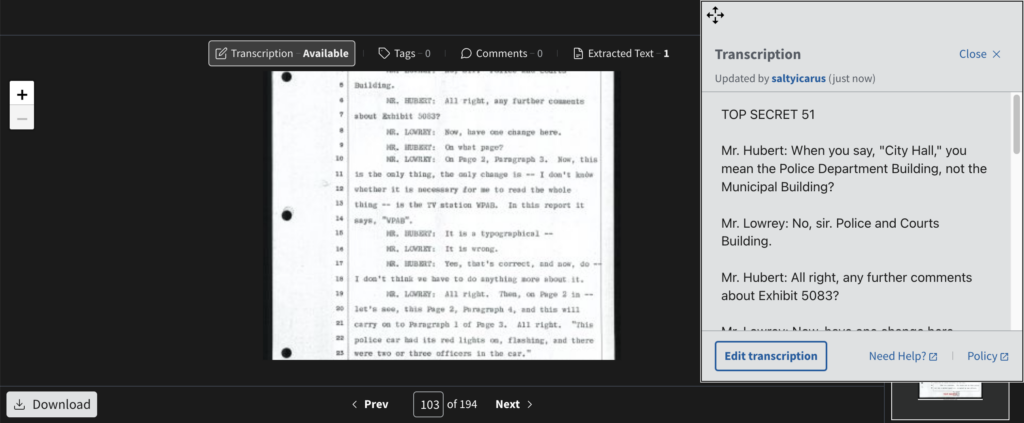
I found this project to be rather enjoyable. There is something akin to collective effervescence when you get to do work alongside other people for the same cause – making these accessible to the public and easily searchable. While my specific piece didn’t involve having to transcribe cursive writing from a century ago, being able to understand it is still an important aspect to many transcription services.
One response
You’ve accurately detailed the purpose and uses of the Citizen’s Archivist Website. I love the “mission” organization system, as it keeps related documents in one area and takes account of which documents have already been transcribed. I also found the process mostly enjoyable, especially the feeling of working collectively with other historians. It’s fun to think that we are all working together to transcribe the same things for the benefit of the public and other historians!